
Radar Chart
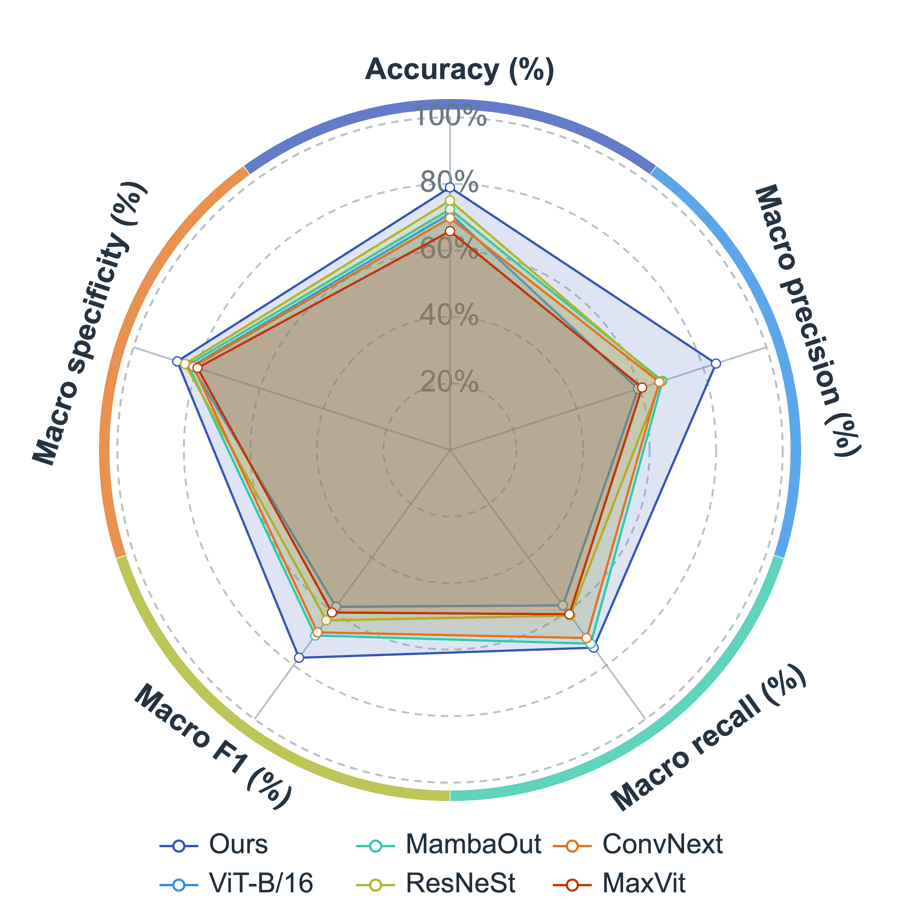
Create a radar chart
Confirm the data layout first, then choose the object labels and metric columns.
Choose range and output
Use the current selection or the full table, then create a new figure or add to an existing one.
Choose data layout
For a common wide table, choose Objects in Rows: each row is a method, sample, or group, and each numeric metric becomes a radar axis.
Map the object column
The object column is usually a text column such as Method, Sample, or Group. It names each radar line and legend item.
Choose axis metrics
Select at least 3 numeric metric columns, such as Accuracy, F1, or Recall. After creation, refine the grid, lines, fills, and labels.
Click Create Figure when everything is ready.
Create Figure
nature_2025_fig4_external_lesion_radar_smartplot_wide
Radar Chart Setup
Data Range
Output
Radar charts compare objects across multiple metrics. Choose the data layout first to avoid swapping objects and metrics.
Data Layout
Common: each row is a method/sample; Accuracy, F1, etc. are radar axes.
Adjustable settings
These are the common settings for this plot type. For detailed line, marker, axis, legend, and font styling, see Styling.
- Data layout
- Object column
- Axis metric columns
- Radial axis range
- Grid rings
- Line and fill style