WHAT’S NEW?
SmartPlot V1.75 — AI-connected plotting, clearer composition
SmartPlot 1.75 brings AI-assisted plotting into the foreground through MCP, adds image-aware composition controls, and makes scatter plots more expressive with marginal distributions.
AI can understand and operate the active SmartPlot workspace
The MCP developer preview lets Codex, Claude, Gemini, and other compatible clients read a privacy-safe workspace summary, plan a workflow, and carry out authorized plotting or analysis inside the open project.
- Read project structure, data-table roles, and current figure styling without exposing local file paths or internal IDs.
- Plan complete workflows across data preparation, plotting, analysis, appearance, annotations, and composition.
- Every mutation stays visible in SmartPlot, requires foreground authorization, and enters the undo history.

Imported figures align to the real plot area
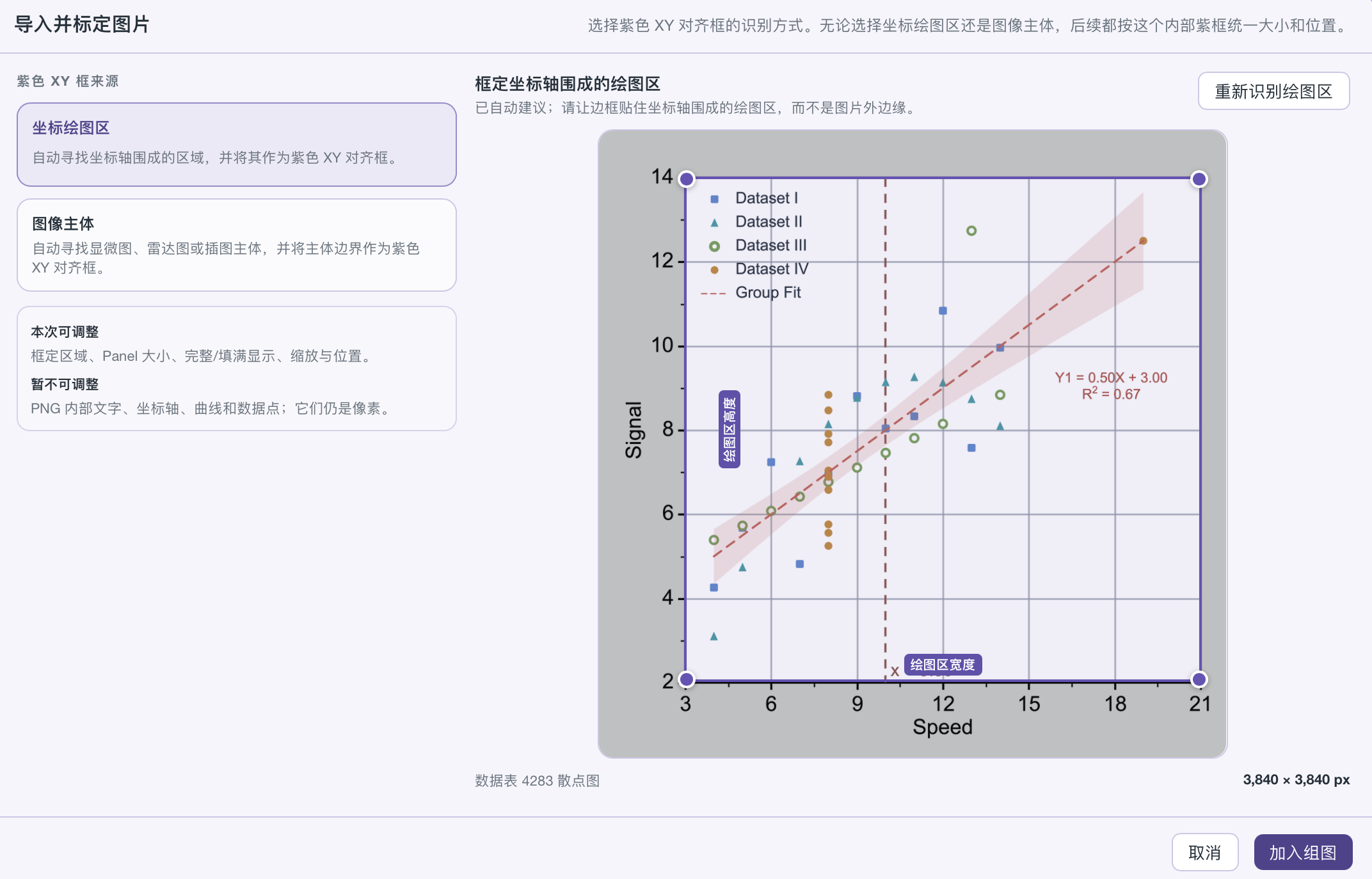
When a PNG enters Composer, SmartPlot can recognize the coordinate plot region or the image body, then use one purple XY frame for sizing, alignment, and panel composition.
- Choose the coordinate plot region when axes define the area that should align across panels.
- Choose the image body for microscopy, radar plots, or illustrations without a conventional axis frame.
- Refine the detected region, panel size, fill mode, scale, and position before adding the image to a group figure.

Connect Codex with a guided three-step setup
SmartPlot detects the MCP connector bundled with the installed app and provides either a terminal command or a safe copyable prompt, so existing AI-client configuration can be preserved.
- Open the project you want the AI client to work with, then choose the connection method shown in Settings.
- Use the terminal command or paste the generated configuration prompt into the AI conversation.
- Create a new task or reload MCP once after configuration; SmartPlot itself does not need to restart.

Scatter plots reveal distributions at the margins
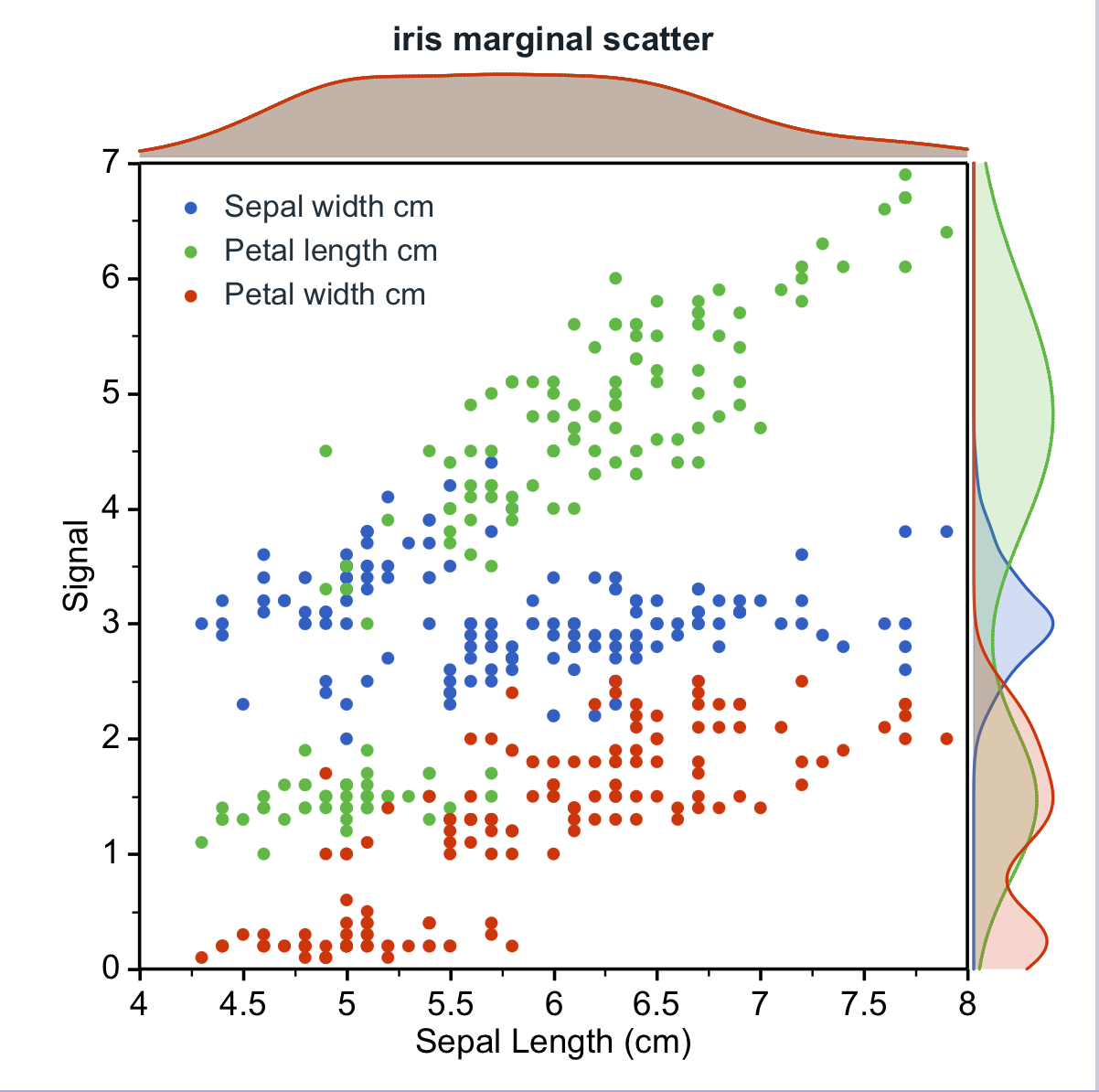
Scatter and bubble plots can add smooth probability-density curves above the X axis and beside the Y axis, making group overlap, separation, and distribution shape easier to read.
- Show the top X density, the right Y density, or both, using a combined curve or separate curves for each series.
- Tune KDE bandwidth to preserve local peaks or emphasize the overall distribution trend.
- Control line style, fill, gradient direction, and fill opacity without changing the scatter marks.
Also included in V1.75
MCP is bundled with the desktop app and keeps all controlled operations inside the visible SmartPlot workspace.
MCP read operations return privacy-safe project structure and styling context instead of raw local paths or unrestricted source data.
MCP plotting, analysis, styling, annotation, and composition changes require foreground confirmation and support undo.
Scatter and bubble plots support top X and right Y marginal KDE curves, combined or grouped by series.
Marginal distributions support bandwidth adjustment, line styling, gradient fills, and independent fill opacity.
Composer can identify either the coordinate plot region or the image body before an imported PNG joins a group figure.
Image calibration uses one consistent XY frame for panel sizing, fill, scaling, and positioning.
Marker shape and fill are independent, including solid and hollow circle, triangle, square, and diamond styles.
MCP setup guidance covers terminal configuration and copyable AI-conversation prompts while preserving existing client servers.
Past News
SmartPlot V1.7
July 14, 2026Bubble charts, two-factor statistics, batch export, stronger heatmaps, and compact multi-panel composition.
Issue 1.65SmartPlot V1.65
July 5, 2026SVG/PPT reliability, richer peak-fit tables, editable inset zooms, large-data input, and Bruker RAW import.
Issue 1.6SmartPlot V1.6
June 25, 2026Group figures, Venn diagrams, dual-Y and horizontal charts, unit editing, and export compatibility.
Issue 1.55SmartPlot V1.55
June 15, 2026Standalone radar charts, visual Add tools, marquee selection, data import append/replace, and fill patterns.