Data processing
Supported processing steps such as smoothing, normalization, baseline correction, derivatives, integration, resampling, and peak finding.
Save one successful data-processing and analysis sequence as a template, then map it to compatible new data.
V1.85 captures the method, parameters, input roles, outputs, and step relationships for the supported categories below—only after an operation succeeds. Failed, cancelled, or unsupported actions are not added.
Supported processing steps such as smoothing, normalization, baseline correction, derivatives, integration, resampling, and peak finding.
Curve fitting, distribution fitting, and peak fitting, including the selected model, algorithm parameters, and output relationships.
Formula-derived columns, column summaries, and grouped summaries, including selected statistics and table structure.
Pearson correlation, correlation matrices, and supported one-factor significance analysis, including comparisons and correction settings.
Supported figures including line, scatter, lollipop, bar, heatmap, pie, radar, histogram, and box plots.
V1.85 does not yet capture two-factor significance steps. Figure creation supports new figures only and does not safely append to an existing figure. The in-app capture status is the source of truth for current support.
V1.85 does not guess generic roles such as group, sample ID, or condition. When applying a template, choose the current dataset or multiple datasets, select Shared X with Multiple Y or X–Y Pairs, then explicitly choose the X and Y columns for each dataset.
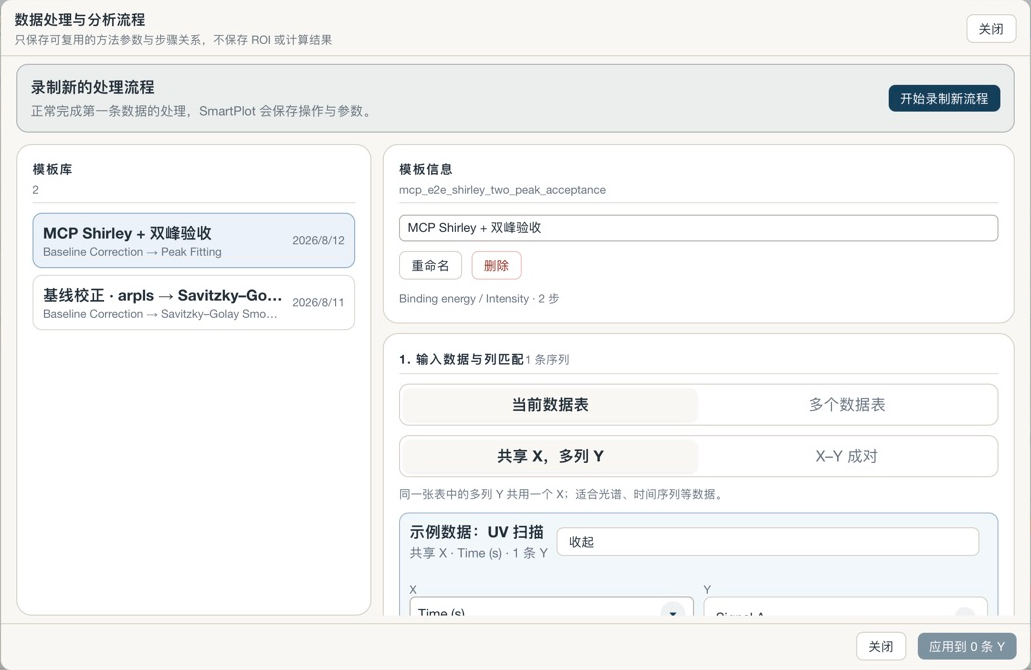
Supported ordered operations, exact parameters, semantic input roles, and step relationships.
Screen, video, audio, data rows, ROIs, manual peak positions, analysis results, or intermediate results.